
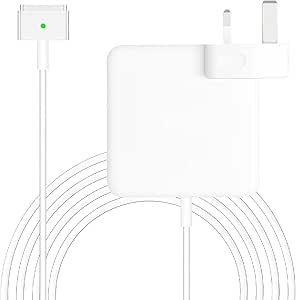
In 2026, the 60W T-Tip Power Adapter remains the essential charger for “legacy” MacBooks produced between late 2012 and 2015. This specific connector is known as MagSafe 2. It is thinner and wider than the original L-Tip MagSafe 1, designed to fit the slimmer profiles of the first Retina Display MacBooks.
1. Compatibility Check (Is this for you?)
The 60W T-Tip is the “Goldilocks” charger—it provides enough power for the 13-inch Pro but can also be safely used with the 11-inch and 13-inch Air models.
| MacBook Model | Year Range | Recommended Wattage |
|---|---|---|
| MacBook Pro 13″ (Retina) | Late 2012 – Early 2015 | 60W |
| MacBook Air 11″ / 13″ | Mid 2012 – 2017 | 45W (60W is a safe upgrade) |
Note: If your MacBook was made before 2012, you likely need the L-Tip (MagSafe 1). If it was made after 2016, you likely need a USB-C charger.
2. Key Features of the T-Tip Design
- Magnetic Safety: The hallmark of the T-Tip is its magnetic connection. If someone trips over your cord, it disconnects cleanly without pulling your laptop off the table.
- LED Status Indicator: * Amber/Orange: The battery is currently charging.
- Green: The battery is fully charged or the laptop is running directly off AC power.
- Smart Charging: Most 2026-era replacements feature “trickle charging.” Once your Mac hits 80%, the charger reduces the current to prevent battery overheating and extend its lifespan.
3. Safety & Maintenance Pro-Tips
- The “Wing” Cable Wrap: The two flip-out wings on the brick are for wrapping the thin cable. Avoid wrapping it too tightly near the base, as this causes “necking” (fraying of the internal wires), which is the #1 cause of MagSafe failure.
- Heat Dissipation: These bricks get very hot during a 0% to 100% charge. Always keep the adapter on a hard surface (desk/floor) rather than a bed or rug to allow air to circulate.
- Pin Cleaning: If the LED doesn’t light up, check the 5 small gold pins in the T-tip. Sometimes dust or tiny metallic debris can get stuck in the magnet. A quick clean with a dry toothbrush usually fixes connection issues.