
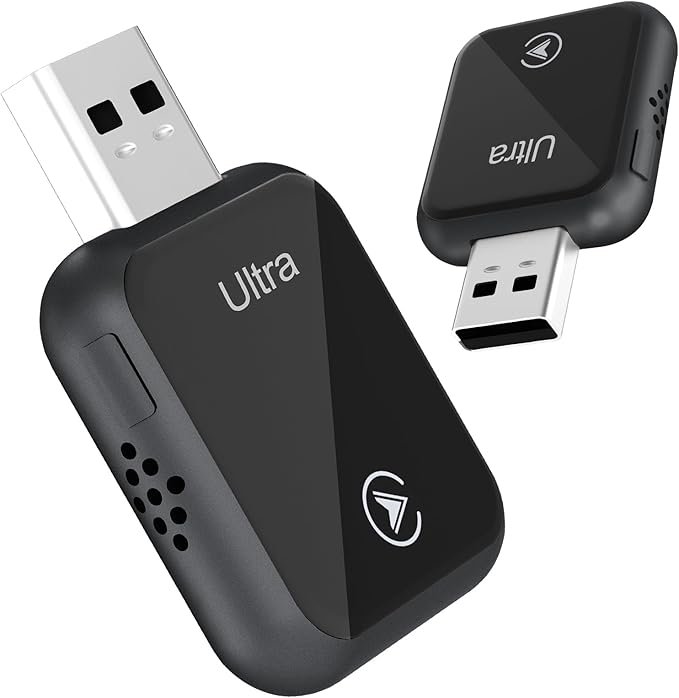
Wireless CarPlay Adapter: A Convenient Way to Enhance Your Driving Experience
In today’s world, wireless CarPlay adapters are becoming an increasingly popular accessory for drivers looking to upgrade their car’s infotainment system without having to invest in a new head unit. If you own a car that supports Apple CarPlay but doesn’t have wireless functionality, a wireless CarPlay adapter is a smart and affordable solution to bring this feature to your car.
In this guide, we’ll explore how a wireless CarPlay adapter works, the benefits of using one, and what you should look for when choosing the right adapter for your needs.
What is Apple CarPlay?
Apple CarPlay is an in-car system that allows you to connect your iPhone to your car’s infotainment system. Through CarPlay, you can access your iPhone’s features directly on your car’s display, including navigation, music, calls, messages, and compatible third-party apps.
Apple CarPlay was initially available only through wired connections, meaning you had to plug your iPhone into your car using a USB cable. However, newer cars and head units now offer wireless CarPlay, which eliminates the need for cables and enables a more seamless, hassle-free experience.
What is a Wireless CarPlay Adapter?
A wireless CarPlay adapter is a small device that connects to your car’s existing USB port, which is typically used for wired CarPlay. The adapter then uses Bluetooth and Wi-Fi to wirelessly connect your iPhone to your car’s infotainment system, providing the same functionality as a wired CarPlay setup but without the need for a physical connection.
With a wireless CarPlay adapter, you can enjoy the convenience of automatic, wireless connection to your CarPlay system every time you start your car, without needing to plug in your phone.
Benefits of Using a Wireless CarPlay Adapter
1. Convenience and Simplicity
- A wireless CarPlay adapter provides a hands-free experience by automatically connecting your iPhone to your car’s infotainment system as soon as you start the car. No more fumbling around for cables, making it a much smoother process.
2. Eliminates Cable Clutter
- Many drivers dislike having cables hanging around their car, especially when they’re driving. A wireless CarPlay adapter gets rid of that clutter and provides a cleaner, more organized dashboard.
3. Faster Connectivity
- With wireless CarPlay, you no longer have to wait for your phone to sync with the system via a USB cable. The connection is usually faster because it works via Bluetooth and Wi-Fi, both of which are designed to handle quick, stable connections.
4. Maintains All CarPlay Features
- When using a wireless CarPlay adapter, you still have full access to all the usual CarPlay features, such as navigation via Apple Maps or Google Maps, listening to music on Apple Music or Spotify, and using third-party apps like Waze, WhatsApp, and more. The only difference is the convenience of being wireless.
5. Compatibility with Older Cars
- If your car doesn’t come with built-in wireless CarPlay but supports wired CarPlay, you can easily upgrade by adding a wireless CarPlay adapter. This is a cost-effective way to modernize your car’s infotainment system without having to replace your head unit.
How Does a Wireless CarPlay Adapter Work?
The operation of a wireless CarPlay adapter is relatively simple:
- Plug the Adapter Into the USB Port: You first plug the wireless CarPlay adapter into your car’s USB port, the same port you would typically use for a wired CarPlay connection.
- Bluetooth and Wi-Fi Connection: Once connected, the adapter establishes a connection with your iPhone through Bluetooth. Once paired, it uses Wi-Fi to transmit the CarPlay data wirelessly.
- Automatic Connection: After the initial setup, the adapter will automatically connect to your iPhone whenever you get into the car and start the engine. This eliminates the need to plug in your phone every time.
- Use Your iPhone: Once connected, your iPhone’s interface appears on your car’s infotainment screen, allowing you to interact with apps, make calls, and more, just as you would with a wired connection.
How to Set Up a Wireless CarPlay Adapter
Setting up a wireless CarPlay adapter is typically a simple process that doesn’t require technical expertise. Here’s how to set it up:
1. Check Compatibility
- Ensure that your car supports Apple CarPlay (either wired or wireless). You can check your car’s manual or infotainment system settings to confirm compatibility.
- Your iPhone should be running iOS 9 or later to be compatible with CarPlay.
2. Plug in the Adapter
- Insert the wireless CarPlay adapter into your car’s USB port, where you would normally connect your phone for wired CarPlay.
3. Pair with Your iPhone
- Your phone will automatically detect the adapter via Bluetooth. Follow the on-screen prompts to complete the pairing process.
- Once paired, the adapter will switch to a Wi-Fi connection for seamless, high-speed data transfer.
4. Use Wireless CarPlay
- After pairing, your iPhone should automatically connect to the system every time you start the car. You can now enjoy a wireless CarPlay experience without needing to plug in your phone.
Top Wireless CarPlay Adapters
Here are a few popular wireless CarPlay adapters available in the market:
1. Carly Wireless CarPlay Adapter
- Features: Known for its fast connection time and ease of use. The Carly adapter works with most vehicles that support wired CarPlay and supports Bluetooth and Wi-Fi connectivity.
- Best for: Those who want a reliable, affordable wireless solution.
2. Carlinkit Wireless CarPlay Adapter
- Features: Carlinkit is one of the most popular wireless CarPlay adapters. It supports USB to wireless CarPlay conversion and works with most cars that have wired CarPlay compatibility. It offers quick pairing and solid connection stability.
- Best for: Users who want a solid, well-reviewed wireless CarPlay adapter with great performance.
3. ATO Wireless CarPlay Adapter
- Features: This adapter offers a stable connection and is known for its easy installation. It supports Android Auto as well, making it a versatile choice for drivers with different phone operating systems.
- Best for: Those who want a budget-friendly option with great compatibility.
4. Binize Wireless CarPlay Adapter
- Features: Binize offers a plug-and-play solution for users who want to convert wired CarPlay into wireless. It supports voice control and steering wheel controls for added convenience.
- Best for: Drivers looking for an easy-to-use wireless CarPlay adapter.
5. ZeaLife Wireless CarPlay Adapter
- Features: Known for its stability and quick startup time, the ZeaLife adapter works with most cars equipped with wired CarPlay and offers a secure connection.
- Best for: Those looking for a stable and high-quality adapter that offers a seamless connection.
Things to Consider When Choosing a Wireless CarPlay Adapter
1. Compatibility
- Ensure that the wireless CarPlay adapter is compatible with your car’s infotainment system and your iPhone model. Most adapters work with cars that support wired CarPlay but check the product specifications for compatibility.
2. Ease of Setup
- Choose an adapter that is easy to install and doesn’t require complicated setups. A plug-and-play option is ideal for quick, hassle-free installation.
3. Connection Stability
- Look for adapters that offer a stable connection via both Bluetooth and Wi-Fi. This ensures that your CarPlay system works smoothly without frequent drops or delays.
4. Speed
- Consider the connection speed of the adapter. A good wireless CarPlay adapter should connect quickly and allow for fast data transmission to avoid lag during use.
5. Price
- Wireless CarPlay adapters vary in price, so it’s important to choose one that fits your budget. While some adapters offer premium features, there are also more affordable options that provide solid performance.
Conclusion
A wireless CarPlay adapter is a great way to upgrade your car’s infotainment system and enjoy the convenience of a cable-free connection. Whether you’re driving for work, leisure, or running errands, a wireless CarPlay adapter lets you access your iPhone’s features seamlessly and hands-free.
With a range of options available, you can easily find the right wireless CarPlay adapter to suit your needs, budget, and car compatibility, providing a more enjoyable and convenient driving experience.