
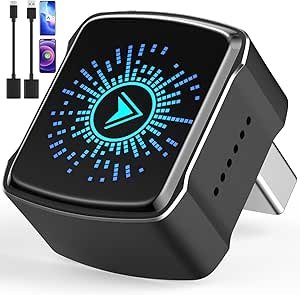
In 2026, the demand for a cable-free driving experience has made wireless CarPlay adapters more reliable and faster than ever. If your car currently supports wired CarPlay (where you have to plug in your phone), these compact dongles act as a “handshake” between your car and your iPhone, allowing for an automatic connection the moment you turn the key.
Here is the 2026 guide to the top performers and what to look for to avoid the “lag” common in older models.
Top Rated Adapters for 2026
Based on the latest benchmarks and user reviews, these models currently lead the market in stability and boot speed.
| Model | Best For | Key Standout Feature |
|---|---|---|
| AAWireless TWO+ | Most Versatile | A physical “Magic Button” to switch between paired phones instantly. |
| Ottocast U2-Air Pro | Speed & Reliability | Boasts sub-10-second boot times and a rock-solid 5.8GHz connection. |
| Carlinkit 5.0 (2-in-1) | Multi-Device Homes | Native support for both Apple CarPlay and Android Auto in one unit. |
| Mirror Touch (CA450) | Streaming Fans | Allows for screen mirroring (YouTube/Netflix) on your car display. |
| Teeran / Yizro | Budget Choice | Ultra-compact “plug-and-forget” units for under $50. |
Why the 2026 Models are Different
If you’ve tried an adapter in the past and were frustrated by audio delay or dropped connections, 2026 hardware has addressed these issues:
- 5.8GHz Wi-Fi Transmission: Most 2026 flagship models have moved from 2.4GHz to the 5.8GHz band. This significantly reduces audio lag during calls and prevents “stuttering” on navigation maps.
- Bluetooth 5.3 Handshaking: The initial connection is now faster and more power-efficient, meaning your phone stays cooler even on long trips.
- OTA (Over-The-Air) Updates: Modern adapters now update their firmware automatically via companion apps. This is critical for ensuring the adapter continues to work after Apple releases a new iOS update.
- Small Form Factors: Many new models, like the Ottocast Mini Pico, are no larger than a standard USB thumb drive, keeping your center console clutter-free.
The “Before You Buy” Checklist
Before purchasing, run through these three requirements to ensure compatibility:
- Does your car have factory-wired CarPlay? These adapters cannot add CarPlay to a car that doesn’t already have the wired version.
- Check the USB Port: Does your car use USB-A or USB-C? Most premium adapters now include both cables in the box, but it’s worth double-checking.
- Phone Compatibility: You’ll need an iPhone 6 or newer running at least iOS 10 (though iOS 16+ is recommended for the best performance in 2026).